
Most UX researchers and designers have tried the same thing: open ChatGPT, type a request for a research plan, a persona, or a set of usability findings, and get something that reads well but feels generic. Not wrong exactly, just… safe. Surface-level. The kind of output that could apply to almost any product, because it wasn’t really built on your users at all.
The instinct is to blame the prompt. So we add more instructions, a role, a format, a tone. Sometimes that helps. Often it doesn’t, because the real issue isn’t how the prompt is written. It’s what happened, or didn’t happen, before it was written.
At UX Prosperar, we work with AI tools constantly across research synthesis, competitor benchmarking, and content structuring. What we’ve learned is that the strongest AI outputs never come from the best-worded prompt. They come from a researcher or designer who did their own thinking first, and used AI to pressure-test it, not replace it.
Why Your AI Output Feels “Almost Right” But Not Quite
Here’s what typically happens. A researcher is scoping a usability study, or a designer is building a persona from interview notes, and they go straight to the AI tool. They type a request, get a response, and start editing it into shape. It’s a reactive loop: prompt, edit, re-prompt, edit again.
The problem is that this loop starts with the AI’s framing of the problem, not yours. Whatever structure ChatGPT or Claude defaults to becomes the scaffolding you’re stuck adjusting, instead of the one built from your own research expertise, your knowledge of the users, and the specific context of the product.
Generic output is what happens when your expertise never actually entered the process. The model can’t know what it wasn’t given, and if you skipped straight to prompting, you may not have fully worked out what you know either.
The Real Problem Isn’t Your Prompt, It’s What Happens Before It
Good prompting frameworks (give it a role, set the context, define the format) are genuinely useful, and worth learning. But they solve the second half of the problem. The first half is deciding what you actually think before AI enters the room at all.
Think of it the way you’d think about a usability test. You wouldn’t walk a participant through a prototype without first mapping your own hypotheses about where they’ll struggle. Skipping that step doesn’t make the test faster, it makes the findings shallower, because you don’t know what you’re really looking for.
Prompting a research or design task works the same way. A short “prompting warm-up,” done away from the keyboard, before you touch AI, is what turns a decent output into one that’s actually usable.
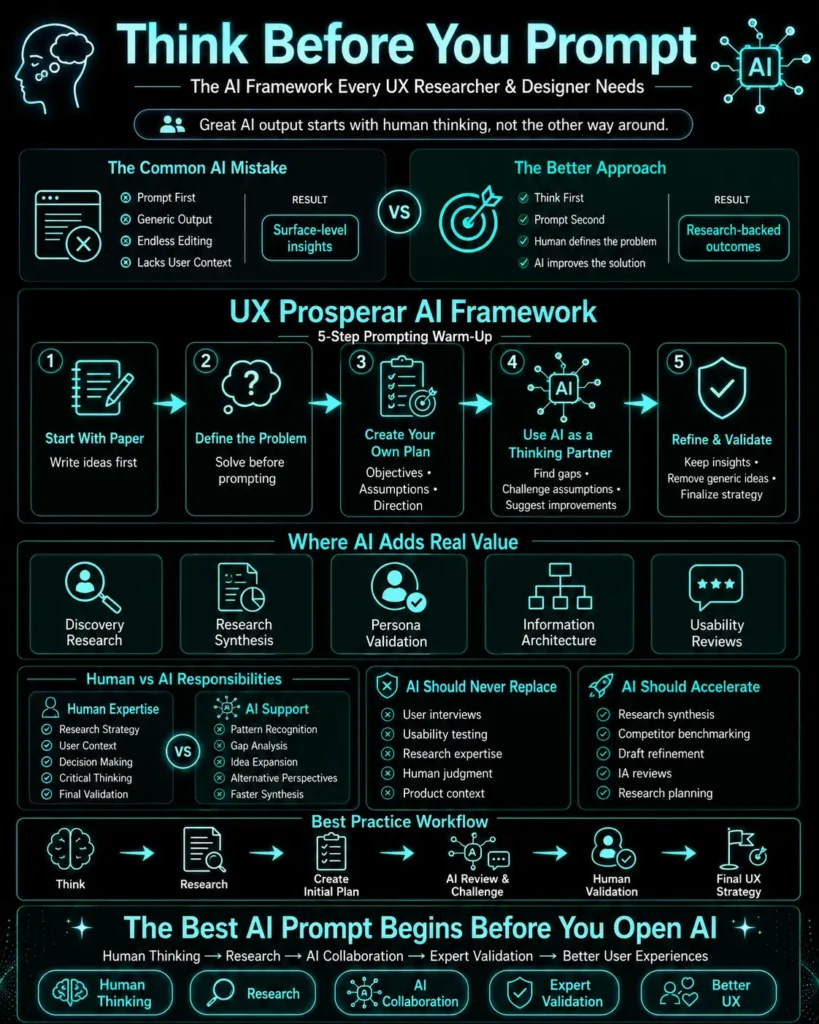
The UX Prosperar Prompting Warm-Up: A 5-Step Framework
This is the sequence we use internally before bringing AI into a research or design task, whether that’s synthesizing interview data, drafting a discovery research plan, or stress-testing an information architecture.
Step 1: Start With Paper, Not a Prompt Box
Before opening any AI tool, sit with the problem using nothing but a notebook, a whiteboard, or a blank document. This isn’t about being anti-tech, it’s about avoiding reactive prompting. When the AI tool is open in front of you, it’s tempting to let it lead. Taking it out of the picture for five minutes forces you to lead instead.
Step 2: Ask “How Would I Solve This?”, Not “How Should I Prompt This?”
Before thinking about wording, think about the actual problem. If you’re building a customer journey map, ask yourself what you already know about where users drop off, based on past research, support tickets, or session recordings. If you’re planning a discovery study, ask what you’d want to learn first and why.
This step is where your research training and product context do the heavy lifting. It’s also the step most people skip entirely, going straight from “I have a task” to “let me prompt this.”
Step 3: Draft a Rough Plan or Structure
Write out your own approach in a few bullet points. Not polished, just sequenced. For a usability audit, that might be: define what “good” looks like for this flow, list the friction points you’d expect based on the empathy map, decide what to test first. This turns a vague task into something concrete you can hand to AI as a starting point, rather than a blank request.
Step 4: Bring AI in as a Thinking Partner, Not a Solver
This is the step that separates strong AI use from weak AI use. Instead of asking AI to solve the problem, share your draft plan and ask it to strengthen it. Something like: “Here’s the research approach I’ve outlined for this checkout flow audit. Where are the gaps? What would a senior UX researcher push back on?”
This keeps your framing in control while using AI to surface blind spots, alternative methodologies, or considerations you hadn’t accounted for.
Step 5: Revise With What’s Useful, Discard What Isn’t
Go back to your original plan and integrate only the parts of the AI’s response that genuinely sharpen it. Not everything AI suggests will fit your product, your users, or your constraints, and that’s expected. The goal isn’t a plan written by AI. It’s your plan, made stronger by a second perspective.
By the time you’re actually prompting AI for the research plan, persona draft, or synthesis document itself, you already know exactly what you need from it. That’s what makes the output specific instead of generic.
Prompts to Use at Each Stage of Your UX Process
Once the warm-up is done, here’s where AI prompting adds real value in a UX workflow, structured around the stages research and design typically move through:
Discovery and research planning: Share your draft research objectives and ask AI to identify gaps in your methodology or suggest which questions are likely to produce leading, non-objective responses.
Synthesis: Feed in raw interview notes or survey verbatims (with identifying details removed) and ask AI to group them into themes, but always cross-check the groupings against the transcripts yourself. AI is fast at pattern spotting and unreliable at knowing which patterns actually matter to your business.
Persona and journey mapping: Use AI to stress-test a persona draft for internal consistency, for example, asking whether the stated goals and described behaviours actually align, rather than asking AI to invent a persona from a one-line prompt. If you haven’t mapped emotional context yet, our guide on what empathy maps are and how they support more user-centred design is a useful step before this stage.
Information architecture and usability review: Describe your navigation structure and ask AI to role-play as a first-time user trying to complete a specific task, then flag where the labelling or hierarchy would confuse them.
In every case, the pattern holds: AI performs best when it’s reacting to something you’ve already built, not generating something from nothing.
Why This Matters More in Research-Driven UX Work
Generic AI habits are a bigger risk in UX than in most other disciplines, because UX work is fundamentally about specificity. A persona that could describe anyone describes no one. A usability recommendation that isn’t grounded in this product’s flow and this audience’s behaviour isn’t actionable, it’s a guess with better formatting.
We’ve written before about the small, overlooked mistakes in UI/UX design that quietly hurt conversions. Treating AI as a shortcut around research rather than a support for it is one of the newer versions of that same mistake, just less visible because the output looks polished.
The businesses that get real value from AI in their design and research process aren’t the ones with the cleverest prompts. They’re the ones who never stopped doing the thinking, and simply found a faster way to pressure-test it.
How UX Prosperar Uses AI Without Losing the Research
At UX Prosperar, AI tools support our process, they don’t replace the research-driven approach our clients come to us for. We use AI to accelerate synthesis, benchmark competitors faster, and stress-test strategic recommendations, but every insight is still grounded in real qualitative and quantitative research with actual users, not generated assumptions about them.
That distinction matters when the output feeds into decisions about acquisition, retention, or conversion. If you’re exploring how a stronger research foundation, not just faster tools, could improve your product’s experience, our discovery research and UX strategy services are built around exactly that.
Frequently Asked Questions
1. Does AI actually improve UX research output, or does it just make it faster?
Both, but only if the underlying research is sound. AI speeds up synthesis, drafting, and stress-testing, but it can’t substitute for talking to real users. Used on top of solid research, it improves quality. Used instead of research, it just produces faster generic output.
2. What’s the biggest mistake UX teams make when using ChatGPT or similar tools?
Skipping their own thinking and going straight to prompting. This produces output shaped by the AI’s default assumptions rather than the researcher’s expertise and knowledge of the actual users.
3. Can AI replace user interviews or usability testing?
No. AI can help you plan interviews, draft discussion guides, and synthesize what you learn, but it cannot generate reliable insight about how real users behave. That still requires primary research.
4. How does UX Prosperar use AI in its own research process?
We use AI to accelerate synthesis, benchmarking, and stress-testing of strategic recommendations, while keeping all core insights grounded in real qualitative and quantitative research with users.
5. What’s a simple first step for a UX team wanting to use AI more effectively?
Before prompting, write out your own approach to the problem on paper first. Bring AI in to pressure-test that plan rather than asking it to create one from a blank prompt.
Let’s Build AI-Smart, Research-Backed UX
Better AI output starts with better thinking, and better thinking starts with research grounded in real users. If you’re ready to strengthen your UX process with both, let’s talk.
Typical project duration: 4–8 weeks, depending on scope.

At UX Prosperar, we don’t believe in one-size-fits-all. Every project has its own goals, users, and challenges, so the services we use depend on your specific requirements. Here’s how our offerings fit together to create products that both look stunning and work flawlessly.
1. UI/UX Design for Web, Mobile & SaaS
We design responsive, conversion-focused interfaces that adapt seamlessly across devices and platforms, whether it’s a corporate website, a mobile app, or a SaaS dashboard.
Often paired with:
- UX Research to understand your users before designing
- Wireframing to map the user journey before final visuals
2. UX Design and Research
Before any pixels are drawn, we dig into user interviews, usability testing, competitor analysis, and data review. This ensures every design choice is validated and goal-driven.
Often paired with:
- Customer Journey Mapping to align every touchpoint
- Usability Studies for deeper, real-world user insights
3. User Interface Design & Product Design
We simplify complex workflows into clear, user-friendly interfaces, from mobile apps to enterprise software. Our goal is to make interaction effortless and intuitive.
Often paired with:
- Design Sprints to rapidly prototype and validate ideas
- Content Strategy & UX Copywriting to ensure words guide users naturally
4. Product Design Services & Product Development Consulting
For startups and enterprises, we can support the entire journey, from early ideation to launch. You decide how deep we get involved.
Often paired with:
- Wireframing & Prototyping for early validation
- Usability Testing before development investments
5. Wireframing & Interactive Prototypes
Before code, we bring your product to life in clickable prototypes. This lets you test, iterate, and refine early, saving development time and cost.
Often paired with:
- UX Research to validate the flow with real users
- Design Systems to ensure consistency when scaling
6. Usability Testing & Usability Studies
We go beyond theory. We put your product in front of real users and watch how they interact. From quick hallway tests to in-depth usability studies, we gather insights that refine your product to be intuitive, smooth, and conversion-friendly.
Often paired with:
- UX Audits for a full product health check
- Customer Journey Mapping to ensure every touchpoint works together
7. Customer Journey Mapping
We map every step your users take before, during, and after using your product. This ensures all touchpoints feel connected and intentional.
Often paired with:
- Content Strategy / UX Copywriting to guide actions
- UI Design to visually align with the journey
8. Content Strategy / UX Copywriting
The right words help users take the right action. We craft microcopy, onboarding text, CTAs, and content flows that improve usability and conversions.
Often paired with:
- Design Sprints to test language quickly
- UI Design for perfect visual-text alignment
9. Design Sprints
When you need to move fast without compromising quality, we run focused 4-5 day sprints to rapidly ideate, design, prototype, and test ideas.
Often paired with:
- Wireframing & Prototyping for sprint outcomes
- Usability Testing to validate the sprint output
10. UX Audits
Is your product underperforming? We analyze it from usability, accessibility, and conversion standpoints to identify and fix issues.
Often paired with:
- Usability Testing for deeper user insights
- Customer Journey Mapping to spot big-picture issues
For some clients, the focus might be solely on UX Research + Wireframes. For others, it’s a full end-to-end process from research to product launch. The service mix is tailored to your goals, budget, and timeline. Each service is designed to work seamlessly with others for maximum impact.
UX Prosperar: UI/UX Design Agency With a Difference
- Consistent & Scalable Design Systems that grow with your product
- Cross-Device UX & UI Design Services for mobile, web, desktop, and SaaS
- Fast Prototyping & Iteration: see results early and often
- Developer-Ready Assets for smooth handoff and faster builds
Why Choose UX Prosperar for UI/UX Design?
Most agencies focus only on visuals. We start with research-led UX design, understanding your users, your business model, and your market, so your product doesn’t just look great, it performs.
Here’s why our clients love working with us:
- User-Friendly Interfaces – Websites, apps, and dashboards that feel effortless & responsive to use
- Scalable Design Systems – Future-proof designs that grow with your product
- Developer-Ready Deliverables – Clear, organized assets for smooth handoff
- Fast & Transparent Process – See results early, give feedback often
Industries We Serve
SaaS • E-Commerce • FinTech • HealthTech • Logistics • B2B Tools • Corporate Websites
Let’s Design a Product Your Users Will Love
Don’t risk launching a product that confuses users or loses them at the first click.
With UX Prosperar’s UI/UX strategic design services, you’ll get a hybrid, responsive, and scalable design backed by real user insights.
Book Your UX Audit Today
Let’s talk about how we can turn your digital product into something people want to use.