

Imagine your team sitting around, tossing around abstract ideas like “make it bold, but not loud,” or “minimalist, yet really human.” Everyone nods politely… and then crickets. That’s where the magic of mood boards comes in.
What Is a Mood Board?
Think of a mood board as your creative roadmap before you even touch design software. It’s not a wireframe. It’s not a prototype. It’s more like a visual whisper: colors, fonts, imagery, and little bits of tone that hint at the vibe you want to create.
In simple terms, a UX design mood board is like the first toast when two people meet, or when your team and your product vision meet. It starts the conversation with emotion, not pixels.
If you’ve ever worked on a product where everyone had a different mental picture, you know how much time gets lost in misalignment. This is where UX research plays a role, it helps you understand your audience before you even start mood boarding, so your visual direction is grounded in truth, not guesswork.
Why It Matters
Let’s say you’re Startup “ZenTrack,” building a meditation app for stressed-out professionals. You might describe it as “calm, friendly, grounded.” But people hear different things. One thinks “spa,” another thinks “vanilla.” A mood board brings everyone onto the same cozy page at once.
You don’t waste time tossing around vague adjectives. You look at visuals and say, “Yep, that feels like ZenTrack.”
In UX, it’s the same as mapping a user’s emotional journey, something we often do in a customer journey mapping process. Mood boards give you the look and feel, while journey maps give you the flow. Together, they’re unstoppable.
How to Create a Mood Board (Even If You’re Not a Designer)
Here’s a simple, no-fancy-terms process that any team can follow:
- Start with Your Why
Ask yourselves: Who’s the user? What emotion are we aiming for? What vibe must be avoided?- For ZenTrack: “We want users to feel immediately at ease, warm, soft, and approachable, not cold or clinical.”
- Gather Visual Inspiration with Intention
Hunt for colors, typography, icons, images, even sample microcopy. Think of tools like Milanote, Canva, or just drag-and-drop slides. But don’t just collect pretty stuff, be purposeful.- Maybe you include softly glowing lights, handwritten letter-style fonts, scenes of serene mornings…
- Organize by Theme
Group your visuals, color palettes here, font styles there, imagery elsewhere, tone of copy separately. It helps people truly read the mood board, not just glance at it. - Add Short Notes (Annotations)
A quick note, “this font feels gentle, human, not techy”; “this image is cozy morning light, not harsh ‘new year resolution’ energy.” These little notes help guide the conversation. - Share, Collect Feedback, Adjust
Show it to your team: designers, PMs, marketing, maybe a real user. Ask “What feels right? What feels off-brand?” Tweak until it truly clicks.
Mood Board Examples That Bring It Home
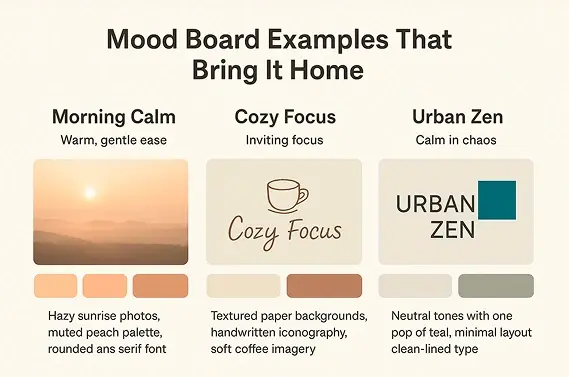
Let’s revisit our imaginary ZenTrack:
| Example | Mood | Key Elements |
| Morning Calm | Warm, gentle ease | Hazy sunrise photos, muted peach palette, rounded sans serif font |
| Cozy Focus | Inviting focus | Textured paper backgrounds, handwritten iconography, soft coffee imagery |
| Urban Zen | Calm in chaos | Neutral tones with one pop of teal, minimal layout, clean-lined type |
These aren’t just pretty, they guide everything that comes next: microcopy, UI tone, onboarding screens, even the onboarding flow tempo.
How to Use Your Mood Board in Design
- Validate Emotion with Real Users
Show it in early UX interviews: “What do you feel when you see this?” It’s early emotional data, a huge win over guessing. - Guide UI Design and Wireframes
Designers use the mood board to pick their toolkit, colors, spacing, imagery, vibe, and UI details. For complex apps, pairing this with a UI/UX usability study ensures you’re not just making things look good, but making them easy to use. - Align Copy and Tone
If your mood board has soft, kind vibes, your CTAs shouldn’t scream “BUY NOW.” Instead, “Let’s begin” feels just right. - Avoid Team Confusion
When marketing says “luxury,” product says “fast,” and dev says “minimal”, the mood board shows the real overlap. Everyone’s designing to feel the same thing.
How ZenTrack Saved Time and Heartache
ZenTrack’s team once spent 3 weeks arguing over the app’s look. Some mocked up bright neon boldness, others pitched icy grays and sleek lines. Nothing matched. But once the mood board came together, warm, soft, handwritten vibes, everything fell into place.
Designers sketched screens that felt cozy, copywriters wrote calming tone-of-voice lines, and marketers even shifted their tagline to “Find your calm edge.” The project moved faster, and the app resonated in testing. Because they aligned early, they avoided weeks of churn.
This process, rooted in research, guided by UX design and research principles, meant fewer redesigns and faster go-to-market.
Mood Boards, Your Pre-Prototyping Superpower
If wireframes are the skeleton, mood boards are the soul. They bring emotional clarity before a single pixel is pushed. For UX design, they’re not optional, they’re strategy.
Ready to Stop Guessing and Start Feeling?
At UX Prosperar, we don’t just make mood boards, we combine them with design sprints, customer journey mapping, and deep UX research to make sure your design feels right and works right.
Let’s build something your users can feel. Reach out to us and we’ll make your brand unforgettable.
Typical project duration: 4–8 weeks, depending on scope.
At UX Prosperar, we don’t believe in one-size-fits-all. Every project has its own goals, users, and challenges, so the services we use depend on your specific requirements. Here’s how our offerings fit together to create products that both look stunning and work flawlessly.
1. UI/UX Design for Web, Mobile & SaaS
We design responsive, conversion-focused interfaces that adapt seamlessly across devices and platforms, whether it’s a corporate website, a mobile app, or a SaaS dashboard.
Often paired with:
- UX Research to understand your users before designing
- Wireframing to map the user journey before final visuals
2. UX Design and Research
Before any pixels are drawn, we dig into user interviews, usability testing, competitor analysis, and data review. This ensures every design choice is validated and goal-driven.
Often paired with:
- Customer Journey Mapping to align every touchpoint
- Usability Studies for deeper, real-world user insights
3. User Interface Design & Product Design
We simplify complex workflows into clear, user-friendly interfaces, from mobile apps to enterprise software. Our goal is to make interaction effortless and intuitive.
Often paired with:
- Design Sprints to rapidly prototype and validate ideas
- Content Strategy & UX Copywriting to ensure words guide users naturally
4. Product Design Services & Product Development Consulting
For startups and enterprises, we can support the entire journey, from early ideation to launch. You decide how deep we get involved.
Often paired with:
- Wireframing & Prototyping for early validation
- Usability Testing before development investments
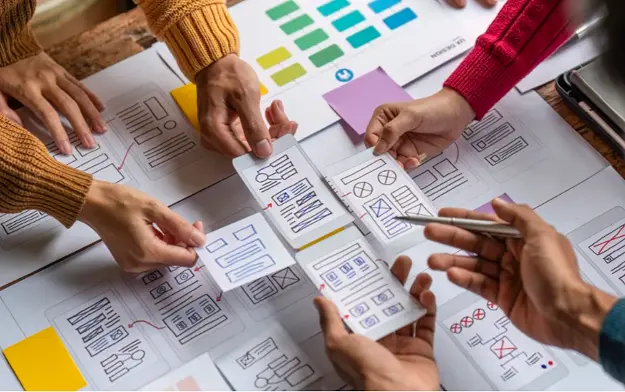
5. Wireframing & Interactive Prototypes
Before code, we bring your product to life in clickable prototypes. This lets you test, iterate, and refine early, saving development time and cost.
Often paired with:
- UX Research to validate the flow with real users
- Design Systems to ensure consistency when scaling
6. Usability Testing & Usability Studies
We go beyond theory. We put your product in front of real users and watch how they interact. From quick hallway tests to in-depth usability studies, we gather insights that refine your product to be intuitive, smooth, and conversion-friendly.
Often paired with:
- UX Audits for a full product health check
- Customer Journey Mapping to ensure every touchpoint works together
7. Customer Journey Mapping
We map every step your users take before, during, and after using your product. This ensures all touchpoints feel connected and intentional.
Often paired with:
- Content Strategy / UX Copywriting to guide actions
- UI Design to visually align with the journey
8. Content Strategy / UX Copywriting
The right words help users take the right action. We craft microcopy, onboarding text, CTAs, and content flows that improve usability and conversions.
Often paired with:
- Design Sprints to test language quickly
- UI Design for perfect visual-text alignment
9. Design Sprints
When you need to move fast without compromising quality, we run focused 4-5 day sprints to rapidly ideate, design, prototype, and test ideas.
Often paired with:
- Wireframing & Prototyping for sprint outcomes
- Usability Testing to validate the sprint output
10. UX Audits
Is your product underperforming? We analyze it from usability, accessibility, and conversion standpoints to identify and fix issues.
Often paired with:
- Usability Testing for deeper user insights
- Customer Journey Mapping to spot big-picture issues
For some clients, the focus might be solely on UX Research + Wireframes. For others, it’s a full end-to-end process from research to product launch. The service mix is tailored to your goals, budget, and timeline. Each service is designed to work seamlessly with others for maximum impact.
UX Prosperar: UI/UX Design Agency With a Difference
- Consistent & Scalable Design Systems that grow with your product
- Cross-Device UX & UI Design Services for mobile, web, desktop, and SaaS
- Fast Prototyping & Iteration: see results early and often
- Developer-Ready Assets for smooth handoff and faster builds
Why Choose UX Prosperar for UI/UX Design?
Most agencies focus only on visuals. We start with research-led UX design, understanding your users, your business model, and your market, so your product doesn’t just look great, it performs.
Here’s why our clients love working with us:
- User-Friendly Interfaces – Websites, apps, and dashboards that feel effortless & responsive to use
- Scalable Design Systems – Future-proof designs that grow with your product
- Developer-Ready Deliverables – Clear, organized assets for smooth handoff
- Fast & Transparent Process – See results early, give feedback often
Industries We Serve
SaaS • E-Commerce • FinTech • HealthTech • Logistics • B2B Tools • Corporate Websites
Let’s Design a Product Your Users Will Love
Don’t risk launching a product that confuses users or loses them at the first click.
With UX Prosperar’s UI/UX strategic design services, you’ll get a hybrid, responsive, and scalable design backed by real user insights.
Book Your UX Audit Today
Let’s talk about how we can turn your digital product into something people want to use.