
Try this. Ask an AI tool to design a checkout flow. It will hand you one in seconds, clean and confident looking. Ask again with a slightly different prompt and you get another, just as polished. Now ask if either one is actually good for your users. It will still say yes.
That’s the quiet flaw hiding inside a lot of AI enthusiasm in product design right now. AI is genuinely great at producing things. It isn’t built for pushing back. And knowing when to say “this isn’t working” is often what separates genuinely user-centric design from a product people just put up with.
What the numbers actually show
A recent global workplace study surveyed 20,000 knowledge workers across the world, and one figure jumped out: 86% of AI users say they treat AI outputs as a starting point, not a final answer, and stay responsible for the thinking themselves. Not the AI. Them.
That number tells you a lot on its own. People getting real value from AI aren’t handing over the keys. They’re staying in the driver’s seat, letting AI speed things up while their own judgment stays fully switched on.
The same study also found 49% of AI users say quality control is becoming more important, and 48% say critical thinking is too. So as AI does more of the producing, humans have to get sharper, not lazier, about what actually deserves to ship.
Somewhere, right now, this is happening
Picture a product team anywhere, could be Bengaluru, Berlin, or Sao Paulo, racing to launch a new feature by Friday. Someone types a prompt into an AI design tool: “design a settings screen for a fitness app.” Within a few seconds, out comes a screen. Toggles in the right places, icons that make sense, a layout that looks finished.
Except nobody on the team has watched a real person try to turn off a workout reminder. Nobody has asked what confuses them. The AI doesn’t know that either. It built a screen from patterns it has seen thousands of times, not from the actual user opening this app half asleep on a Tuesday, trying to silence a notification before a 9am meeting.
This is why so much AI assisted design ends up feeling generic. It isn’t that AI is bad at design. It’s answering a different question than the one that matters. It knows what a settings screen usually looks like. It has no way of knowing what this specific person needs, or where they’ll get stuck.
That second question needs a human. More specifically, it needs proper discovery research.
Someone has to be willing to say no
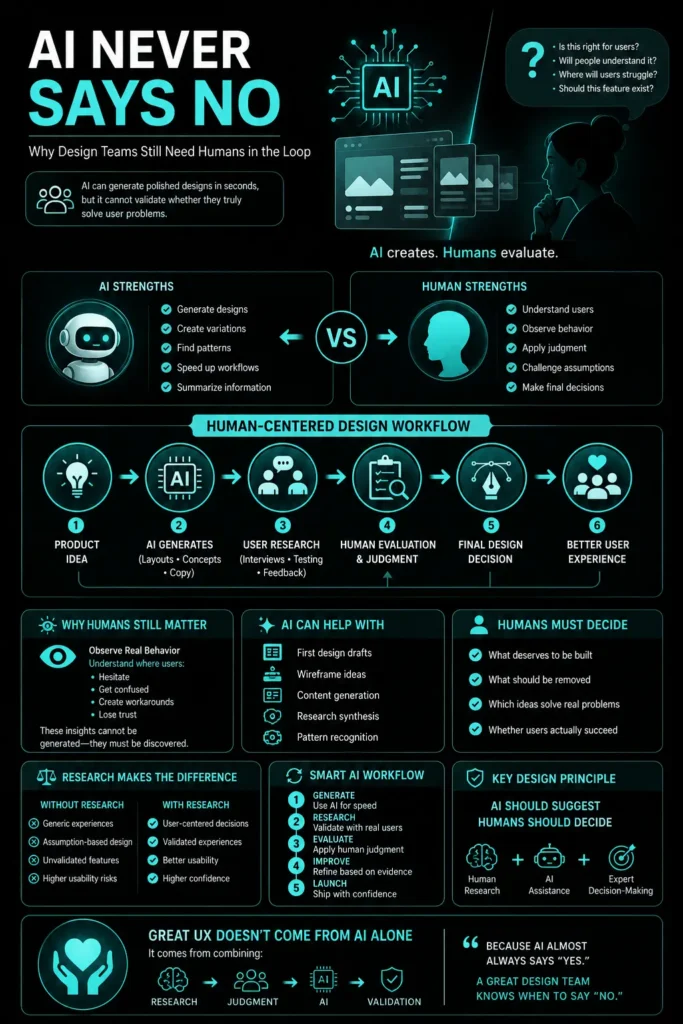
Here’s the part teams tend to skip past. AI is a generator by design. It almost never comes back with “actually, don’t build this,” unless you go out of your way to force that kind of critique, and even then it’s working off patterns, not lived experience with your actual users.
Good design judgment includes saying no. A decent researcher or designer will regularly kill an idea, cut a step out of a flow, or tell a stakeholder a feature isn’t ready yet. That instinct comes from watching real people struggle. It doesn’t come from a dataset of what past interfaces tended to look like.
AI can help too, to be fair. Feed it interview transcripts and it’ll pull out themes fast. Feed it usage data and it might catch a pattern a human would miss. That’s useful. But a structured summary of insights isn’t the same as understanding a user’s hesitation, or the small workaround they invented because your product didn’t do what they actually needed. This is exactly the gap a good UX research agency is built to close.
So how should teams actually work then
There’s a habit worth borrowing from that same research. The professionals getting the most out of AI at work aren’t the ones using it constantly without a second thought. They’re the ones being deliberate, almost picky, about when to reach for it and when not to.
- 45% deliberately do some work without any AI involved at all, just to keep their own skills from going soft
- 51% pause before even starting a task to decide what should go to AI and what needs a human
That pause matters more than it sounds like. It’s a small moment of judgment before any work even begins. For a design team, that might look something like this in practice:
- Let AI generate the first drafts, layout options, or quick copy variations
- Bring in real user research to test, validate, or straight up challenge those drafts
- Have an actual human make the final call on what ships and what gets cut
AI shrinks the time it takes to get from a blank page to a first draft. Humans still have to decide whether that draft even deserves to exist in the first place.
Where this leaves us
AI is going to keep getting better at producing designs that look polished on the surface. Which is exactly why human oversight matters more now, not less. The teams that build genuinely user-centric products won’t be the ones using AI the most. They’ll be the ones who bake real user understanding into their UX strategy from the start, and know where AI’s judgment stops.
AI will basically always say yes. Somebody on your team still has to know when to say no.
If your team wants products built on real user behavior instead of AI generated assumptions, that’s the exact gap UX Prosperar, a research driven UX design agency in Dubai, helps close.
FAQs
1. Does this mean AI shouldn’t be used in the design process at all?
Not really, no. AI is genuinely useful for speeding up early drafts, exploring layout options, and summarizing research data. The problem isn’t using AI, it’s using it without a human checking the work before decisions get locked in.
2. How do I know when a decision needs human research instead of AI?
A decent rule of thumb: if the decision affects how real users feel, behave, or get stuck, it probably needs human research. AI can shape structure and options, but it can’t observe hesitation or confusion the way watching a real person struggle can.
3. AI has been trained on huge amounts of design data. Shouldn’t it already know what works?
It has seen a lot of existing designs, and that’s actually why it tends to produce familiar, generic patterns. What it hasn’t seen is your specific users interacting with your specific product, which is where the real insight usually comes from.
4. What does quality control look like in an AI assisted workflow, practically speaking?
Usually it means a human reviews AI generated output against real user needs and business goals before anything ships, rather than approving it just because it looks polished or complete on the surface.
5. Is this only relevant for large companies with big research budgets?
Not at all. Even small, ongoing research efforts, like a handful of short user interviews or a quick usability testing round, give small teams the same protective layer of judgment that keeps AI output grounded in what real users actually need.
Typical project duration: 4–8 weeks, depending on scope.
At UX Prosperar, we don’t believe in one-size-fits-all. Every project has its own goals, users, and challenges, so the services we use depend on your specific requirements. Here’s how our offerings fit together to create products that both look stunning and work flawlessly.
1. UI/UX Design for Web, Mobile & SaaS
We design responsive, conversion-focused interfaces that adapt seamlessly across devices and platforms, whether it’s a corporate website, a mobile app, or a SaaS dashboard.
Often paired with:
- UX Research to understand your users before designing
- Wireframing to map the user journey before final visuals
2. UX Design and Research
Before any pixels are drawn, we dig into user interviews, usability testing, competitor analysis, and data review. This ensures every design choice is validated and goal-driven.
Often paired with:
- Customer Journey Mapping to align every touchpoint
- Usability Studies for deeper, real-world user insights
3. User Interface Design & Product Design
We simplify complex workflows into clear, user-friendly interfaces, from mobile apps to enterprise software. Our goal is to make interaction effortless and intuitive.
Often paired with:
- Design Sprints to rapidly prototype and validate ideas
- Content Strategy & UX Copywriting to ensure words guide users naturally
4. Product Design Services & Product Development Consulting
For startups and enterprises, we can support the entire journey, from early ideation to launch. You decide how deep we get involved.
Often paired with:
- Wireframing & Prototyping for early validation
- Usability Testing before development investments
5. Wireframing & Interactive Prototypes
Before code, we bring your product to life in clickable prototypes. This lets you test, iterate, and refine early, saving development time and cost.
Often paired with:
- UX Research to validate the flow with real users
- Design Systems to ensure consistency when scaling
6. Usability Testing & Usability Studies
We go beyond theory. We put your product in front of real users and watch how they interact. From quick hallway tests to in-depth usability studies, we gather insights that refine your product to be intuitive, smooth, and conversion-friendly.
Often paired with:
- UX Audits for a full product health check
- Customer Journey Mapping to ensure every touchpoint works together
7. Customer Journey Mapping
We map every step your users take before, during, and after using your product. This ensures all touchpoints feel connected and intentional.
Often paired with:
- Content Strategy / UX Copywriting to guide actions
- UI Design to visually align with the journey
8. Content Strategy / UX Copywriting
The right words help users take the right action. We craft microcopy, onboarding text, CTAs, and content flows that improve usability and conversions.
Often paired with:
- Design Sprints to test language quickly
- UI Design for perfect visual-text alignment
9. Design Sprints
When you need to move fast without compromising quality, we run focused 4-5 day sprints to rapidly ideate, design, prototype, and test ideas.
Often paired with:
- Wireframing & Prototyping for sprint outcomes
- Usability Testing to validate the sprint output
10. UX Audits
Is your product underperforming? We analyze it from usability, accessibility, and conversion standpoints to identify and fix issues.
Often paired with:
- Usability Testing for deeper user insights
- Customer Journey Mapping to spot big-picture issues
For some clients, the focus might be solely on UX Research + Wireframes. For others, it’s a full end-to-end process from research to product launch. The service mix is tailored to your goals, budget, and timeline. Each service is designed to work seamlessly with others for maximum impact.
UX Prosperar: UI/UX Design Agency With a Difference
- Consistent & Scalable Design Systems that grow with your product
- Cross-Device UX & UI Design Services for mobile, web, desktop, and SaaS
- Fast Prototyping & Iteration: see results early and often
- Developer-Ready Assets for smooth handoff and faster builds
Why Choose UX Prosperar for UI/UX Design?
Most agencies focus only on visuals. We start with research-led UX design, understanding your users, your business model, and your market, so your product doesn’t just look great, it performs.
Here’s why our clients love working with us:
- User-Friendly Interfaces – Websites, apps, and dashboards that feel effortless & responsive to use
- Scalable Design Systems – Future-proof designs that grow with your product
- Developer-Ready Deliverables – Clear, organized assets for smooth handoff
- Fast & Transparent Process – See results early, give feedback often
Industries We Serve
SaaS • E-Commerce • FinTech • HealthTech • Logistics • B2B Tools • Corporate Websites
Let’s Design a Product Your Users Will Love
Don’t risk launching a product that confuses users or loses them at the first click.
With UX Prosperar’s UI/UX strategic design services, you’ll get a hybrid, responsive, and scalable design backed by real user insights.
Book Your UX Audit Today
Let’s talk about how we can turn your digital product into something people want to use.